
Pipedrive Automation Workflows You Can Build with Mazaal AI in 2026
Use Mazaal AI and Pipedrive for practical CRM workflows. This guide lists the supported Pipedrive triggers and actions, exact workflow designs, field-mapping checks, and safe test cases.
 Enod BataaUpdated August 1, 2026
Most Pipedrive automation examples stop at “new deal creates a Slack message.” That is easy to demonstrate and often useless in a sales team. The harder part is deciding what should be written back to the CRM, what needs a person, and what happens when the record is incomplete.
This guide focuses on those decisions. It uses the Pipedrive triggers and actions currently listed on Mazaal AI’s Pipedrive integration page, checked on 1 August 2026. Connector availability can change, so treat the live app page as the final check before you build.
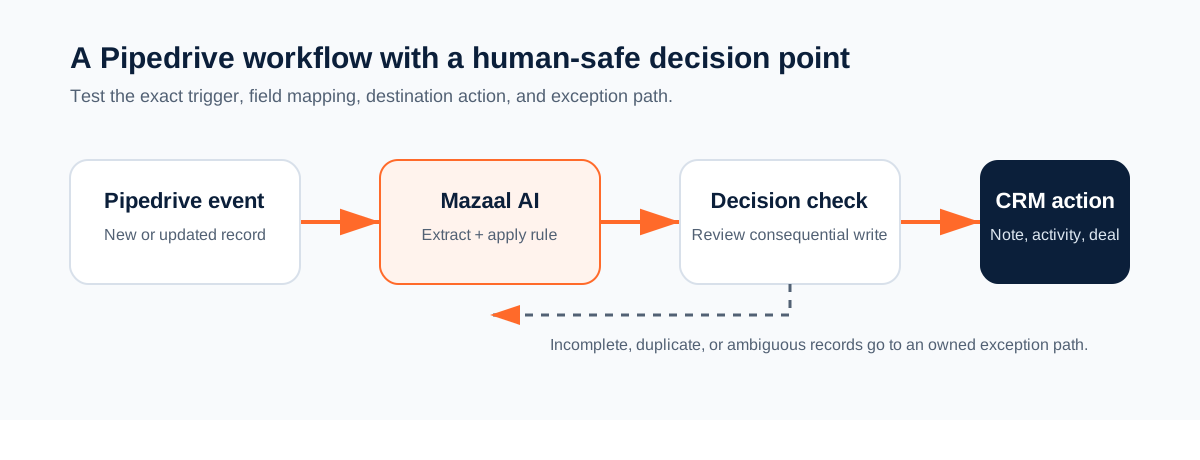
What the integration supports today
The current Pipedrive catalog includes these instant triggers:
- Deal Updated
- Lead Updated
- New Deal
- New Event
- New Person
- Person Updated
Available actions include adding activities, deals, leads, notes, organisations, and people; adding or removing labels; retrieving deal, lead, and person details; listing deals or leads; searching leads, notes, and persons; merging deals or persons; and updating a deal.
That list tells you what the connector can call. It does not tell you whether a particular workflow is sensible. A trigger may fire before the record has the fields you need. An action may write to the wrong object if you map a display name instead of an ID. Design around those failure modes from the beginning.
Workflow 1: create a follow-up activity when a deal changes
This is a good first workflow when salespeople repeatedly leave deals in a stage and rely on memory for the next contact.
Trigger: Pipedrive - Deal Updated
Decision: the deal is in Proposal Sent and has no open follow-up activity
Read: deal ID, owner ID, title, expected close date
Action: Pipedrive - Add Activity
Result: a call or email task linked to the deal
Do not create an activity on every update. Pipedrive records can change many times while a rep edits a note or adjusts a value. Use a condition that describes the transition you care about, and include an idempotency check such as an existing activity with the same subject and due date.
Map these fields explicitly:
| Source | Destination | Check |
|---|---|---|
| Deal ID | Activity deal reference | The activity opens on the intended deal |
| Deal owner ID | Activity owner | The owner still exists and can receive the task |
| Deal title | Activity subject | The subject identifies the account and next step |
| Follow-up date | Activity due date | Timezone and weekend handling are defined |
If the deal has no owner or date, create an exception for the sales operations owner. An unassigned task is not automation; it is a hidden queue.
Workflow 2: qualify a new lead without silently rejecting it
New leads often contain enough text for a first classification but not enough evidence for an irreversible decision. Use Mazaal to structure the information, then write a label or note that a salesperson can inspect.
Trigger: Pipedrive - New Lead or New Person
Read: name, organisation, email, source, description
AI step: extract problem, urgency, company type, and missing fields
Rule: apply the team's written qualification thresholds
Action: add a label or note
Optional action: add a deal only when the rule is satisfied
A useful structured result might look like this:
{
  "segment": "agency",
  "urgency": "high",
  "reason": "Requested help with an active client workflow",
  "missing_fields": ["team_size"],
  "recommended_next_step": "confirm team size",
  "create_deal": true
}
Keep the threshold outside the model prompt where the owner can review it. The model may extract facts and suggest a category. It should not decide that a lead is worthless and delete it. If the input is ambiguous, add a review label and preserve the original text in the note.
Workflow 3: turn a sales event into usable CRM context
Sales notes often arrive in different formats. One rep writes a detailed summary. Another writes “good call, follow up next week.” A New Event trigger can standardise the next action without pretending the event contains more information than it does.
Trigger: Pipedrive - New Event
Read: event text, event ID, related deal or person ID
AI step: write a factual summary and list unresolved questions
Action: Pipedrive - Add Note
Optional action: Add Activity only when a concrete next step and date exist
The association check matters more than the prose. If the event cannot be linked to one deal or person, do not guess. Save an exception with the event ID and ask the owner to select the target record. A polished note attached to the wrong customer is worse than no note.
Workflow 4: review a stalled deal with a human owner
A stalled deal is not automatically a lost deal. It may be waiting on procurement, a legal question, or a customer who has gone quiet. A useful workflow prepares the review instead of changing the stage by itself.
Trigger: Pipedrive - Deal Updated
Condition: no meaningful stage change during the agreed period
Read: recent notes, activities, value, owner, close date
AI step: summarise evidence and identify the missing next action
Approval: sales owner chooses the next action
Action: Update Deal or Add Activity
The approval step is important when the proposed action changes value, owner, stage, or customer communication. The workflow can collect evidence quickly. The person who owns the pipeline remains responsible for the decision.
Field mapping that prevents bad CRM writes
Before publishing any Pipedrive workflow, answer five questions:
- Which record ID is the source of truth?
- Which fields are required by the destination action?
- What happens when the owner, organisation, or date is missing?
- How will a repeated event be detected?
- Who receives the exception when the workflow cannot make a safe write?
Prefer IDs over names. Names are useful for messages, but IDs prevent two people or organisations with similar names from being mixed up. Store the source event ID in the note or workflow record when the destination supports it. That gives the owner something to search when a duplicate appears.
Test with three records before production
Use a test account or clearly marked test records. Run at least these cases:
| Case | Expected result |
|---|---|
| Normal deal update | One correctly linked activity or note |
| Missing owner or due date | No unassigned write; visible exception |
| Repeated update | No duplicate activity for the same event |
| Ambiguous event association | No guessed CRM target; owner review required |
| Lead with incomplete text | Label or note records what is missing |
| Connector failure | Owner receives an error with source ID and retry state |
Inspect Pipedrive after every test. Check the association, owner, labels, notes, dates, and duplicate behaviour. A successful run in the workflow builder is not proof that the CRM record is correct.
Where this integration is not the right choice
Use a native Pipedrive rule when the job is a simple field change that Pipedrive already handles reliably. Mazaal becomes more useful when the workflow must interpret a note, document, or message, combine context from more than one system, or prepare a decision for a person.
The catalog does not guarantee that every custom field is available in every account. Connector scope, account permissions, and the live action schema determine what you can map. Verify the action after connecting Pipedrive rather than designing around a screenshot or an old blog post.
Build one workflow first
Start with the follow-up activity workflow. It has a clear owner, a visible result, and an easy rollback: disable the workflow and remove test activities. Once the field mapping and duplicate check behave correctly, try lead qualification or event summarisation.
Open the Pipedrive integration page to check the current catalog, then build with test records. For the wider question of which automation model fits your business, see the workflow automation tools guide.
Keep reading
All articles →
workflow automation
How to Automate YouTube Video Transcription for Free with Mazaal AI
Discover how to automate YouTube video transcription for free with Mazaal AI. Save time, boost accessibility, and easily repurpose content using automated workflows.

workflow automation
Best AI agent builders in 2026 (comparison for business teams)
A plain-English comparison of Mazaal, Lindy, Gumloop, Zapier Agents, n8n, Relevance AI and Voiceflow for ops, sales and support teams, covering channels, workflows, connectors, models, pricing and setup.
workflow automation
Best Workflow Automation Tools in 2026: A Practical Buyer's Guide
Choose workflow automation software by the job, operating model, and evidence—not a 30-product feature list. Compare the main categories and build a test that proves fit.