
How to Design an Automated Approval Workflow Without Losing Control
A practical approval-workflow design: clear rules, structured evidence, exception paths, and a safe test plan before you automate external actions.
 Enod BataaUpdated August 1, 2026
Approval automation goes wrong when it treats the approval button as the process. The button is only the last step. Before it appears, the workflow must identify the request, gather evidence, apply the right rule, and make it obvious what will happen after someone clicks approve.
Use a purchase request as the first example. The same design works for a contract review, a refund, an access request, or a CRM change, but the owner and evidence will differ. This is an implementation pattern, not a claim that a ready-made approval flow has been tested in your workspace.
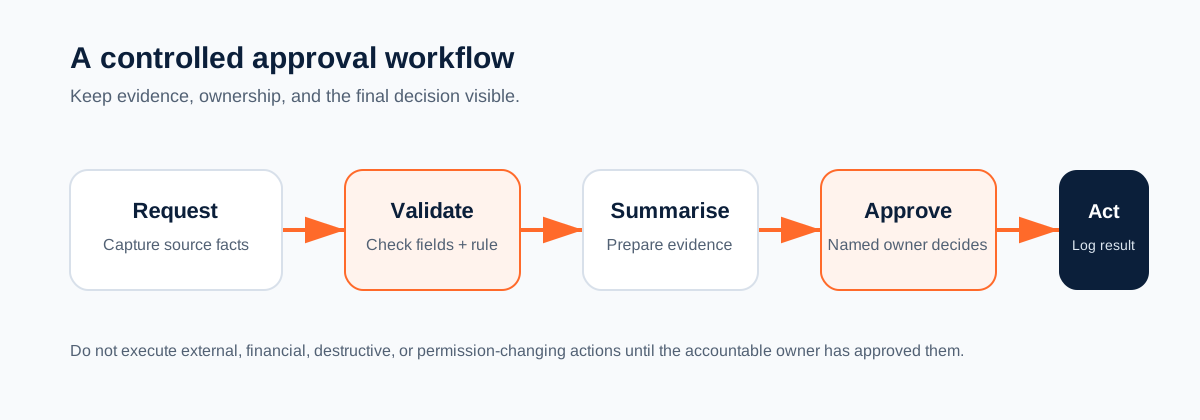
Define the decision in one sentence
Start with a sentence that names the authority and the consequence:
When a purchase request exceeds the team threshold, the budget owner must approve it before the request is sent to the purchasing system.
That sentence gives you four design constraints:
- the request has an amount;
- a threshold determines the route;
- a named person owns the decision;
- the downstream purchase action waits for approval.
If the team cannot agree on those four points, adding an AI step will only hide the disagreement. Fix the rule first.
Model the request as a state machine
An approval record should move through explicit states. A simple version is:
received -> incomplete -> ready_for_review -> approved -> executed
                              |                  |
                              v                  v
                          rejected           execution_failed
Do not use a single approved: true field as the whole audit trail. Keep the request ID, current state, approver, decision time, rule version, evidence link, and downstream result. If the workflow is retried, it should be able to see that an approved request was already executed.
A small decision record might look like this:
{
  "request_id": "PR-1042",
  "requester": "employee-184",
  "amount": 2750,
  "currency": "AUD",
  "vendor": "Example Supplies",
  "cost_centre": "missing",
  "rule": "finance approval above 2000 AUD",
  "state": "incomplete",
  "next_owner": "operations"
}
The example is deliberately incomplete. The correct response is to request the cost centre, not to invent one so the workflow can continue.
A Mazaal implementation pattern
Mazaal is useful here when a request contains context from a document, email, or business system and a person still needs to approve the consequential action. Keep the model in the evidence-preparation part of the flow.
1. Trigger: new request, document, message, or CRM event
2. Collect: request ID, source link, owner, amount, reason, and attachments
3. Validate: required fields, supported currency, and duplicate request ID
4. Summarise: factual decision brief with source references
5. Route: send the brief to the named approver
6. Decide: approve, reject, or request changes
7. Act: execute only the allowed downstream write
8. Record: actor, timestamp, rule version, and destination result
The decision brief should make the evidence easy to inspect:
Request: PR-1042
Requester: Priya Patel, Operations
Amount: $2,750 AUD
Vendor: Example Supplies
Rule: Finance approval is required above $2,000 AUD
Evidence: request link and attached quote
Proposed action: create purchase order
Missing information: cost centre
The model can extract and organise these fields. It should not be the final authority for a payment, permission grant, destructive change, or compliance determination.
Make routing deterministic
Write the routing rules so an operator can inspect them without reading a prompt. For example:
| Condition | Route |
|---|---|
| Amount below the team threshold | Process according to the documented low-risk rule |
| Amount above the threshold | Budget owner approval |
| Contract exception | Legal review before execution |
| Missing required field | Return to requester; no downstream write |
| No response by deadline | Named escalation owner |
| Rejected request | Return the reason to the requester |
A model may classify a request into a category, but the category should map to a rule that the business owner controls. Keep the threshold, approver, and allowed action in configuration or a maintained table where possible.
Prevent duplicate execution
Approval flows often fail on retries. A timeout can happen after the purchasing system accepted the request but before Mazaal received the response. If the workflow retries blindly, it may create a second purchase order.
Use an idempotency key based on the request ID and action type. Before executing, check whether that key already has a successful destination result. After execution, store the destination ID and timestamp. Make “execution status unknown” a visible state that an owner can reconcile instead of automatically repeating the write.
The same principle applies to notifications. A reminder can be repeated safely in some systems. A payment, access grant, or customer-facing message usually needs a stronger duplicate check.
Build the approval message around evidence
An approver should not have to search five systems to understand a request. Include:
- the source record and link;
- the requester and accountable team;
- amount, currency, vendor, and category;
- the rule that selected the approver;
- missing or conflicting fields;
- the proposed downstream action;
- what approval and rejection will do;
- a way to request changes.
Avoid a confident paragraph with no source references. A shorter brief with visible evidence is easier to trust and easier to challenge.
Test before connecting production systems
Use test data and test destinations first. Record the expected result for each case:
| Test case | Expected behaviour |
|---|---|
| Complete request below threshold | Follows the documented low-risk path |
| Complete request above threshold | Named approver receives the full brief |
| Missing amount or currency | No downstream write; requester is asked for the field |
| Conflicting evidence | Request pauses for human review |
| Duplicate request ID | Existing request is shown; no second execution |
| Rejection | Reason is recorded and returned to the requester |
| Approver timeout | Escalation goes to the named fallback owner |
| Connector timeout after acceptance | State becomes execution unknown; no blind retry |
Capture the completed test evidence in the connected workspace before presenting the workflow as a reusable template. A diagram explains the intended design. A test record shows whether the design actually works.
Common failure modes
Too many approvers
Adding reviewers can make a process feel safer while making ownership unclear. Give each rule one accountable approver. Add a second reviewer only when the risk requires a second decision.
Approval without context
“Approve request” is not enough. Show the source facts, policy rule, proposed action, and consequence of the decision.
AI-generated values treated as facts
A summary can be wrong or incomplete. Keep extracted values linked to their source and flag uncertain fields. Never fill a required field from a guess.
Retry rules that repeat writes
Separate retryable reads and notifications from consequential writes. If the destination result is unknown, send the case to reconciliation.
No exception owner
Every incomplete request, duplicate, connector error, and ambiguous decision needs a named human owner. Otherwise the automation creates a queue nobody can see.
When Mazaal is not the right fit
A native approval rule in an ERP, CRM, or procurement tool may be the better choice when the decision is simple, the required fields are already structured, and the system provides a reliable audit trail. Mazaal is a stronger candidate when the request needs interpretation across documents, messages, or connected systems before a person decides.
Verify the exact trigger and action in the Mazaal app directory. Do not design a reusable template around a connector capability you have not checked in the live account.
Start with one request type
Choose one request with a clear owner, one rule, and one downstream action. Implement the state model, run the eight tests above, and review the failure records with the person who will own exceptions. Only then connect production data.
Build a workflow in Mazaal AI or compare this pattern with Pipedrive CRM workflows.
Keep reading
All articles →
workflow automation
Pipedrive Automation Workflows You Can Build with Mazaal AI in 2026
Use Mazaal AI and Pipedrive for practical CRM workflows. This guide lists the supported Pipedrive triggers and actions, exact workflow designs, field-mapping checks, and safe test cases.

workflow automation
Best AI agent builders in 2026 (comparison for business teams)
A plain-English comparison of Mazaal, Lindy, Gumloop, Zapier Agents, n8n, Relevance AI and Voiceflow for ops, sales and support teams, covering channels, workflows, connectors, models, pricing and setup.
AI automation
AI Workflow Automation for Small Business: An Implementation Guide
A practical way for small businesses to choose, test, and operate an AI-assisted workflow without automating chaos or creating an unowned system.