
AI Workflow Automation for Small Business: An Implementation Guide
A practical way for small businesses to choose, test, and operate an AI-assisted workflow without automating chaos or creating an unowned system.
 Enod BataaUpdated August 1, 2026
Small businesses do not need to automate everything. They need to remove the repetitive work that blocks customer response, sales follow-up, operations, or cash collection—without introducing a system no one can maintain.
AI workflow automation is most useful when the work includes a small judgement step: reading an email, extracting details from a document, classifying a request, or preparing a summary for a person to approve.
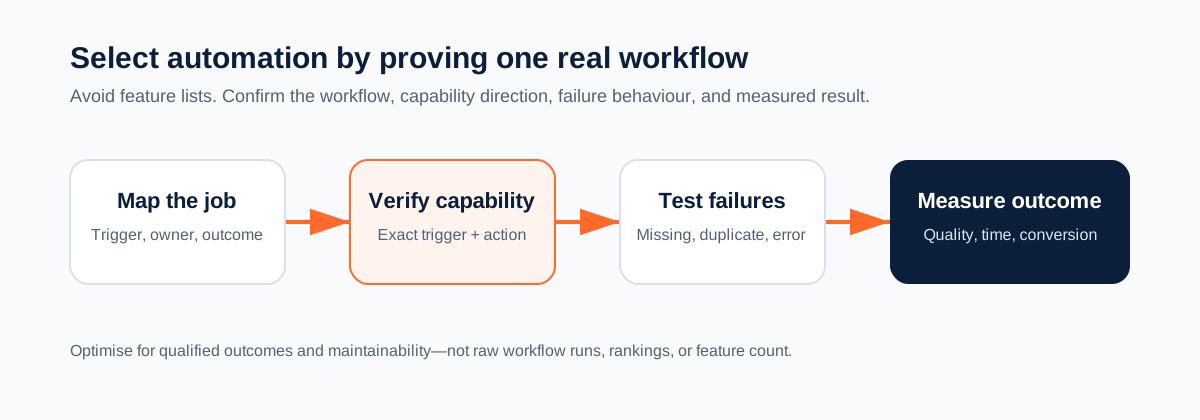
Pick the right first workflow
Choose a process that is:
- repeated at least several times a week;
- narrow enough to describe in one sentence;
- based on information you can access reliably;
- recoverable if it fails;
- owned by a named person.
Good first candidates include inbound lead triage, document-to-CRM updates, appointment follow-up preparation, support-request routing, and approval briefs. Avoid payroll changes, payments, access grants, or irreversible customer messages as your first live workflow.
Calculate the effort worth saving
Use your own baseline rather than an industry claim.
Weekly volume × average manual minutes per case = weekly manual minutes
Weekly manual minutes × hourly fully loaded cost = weekly cost of the current process
Then track the new workflow for four weeks:
- completed cases;
- human-review minutes per case;
- exceptions and rework;
- software credits or task usage;
- customer or sales outcome affected.
A workflow that produces many runs but no qualified outcome is not a success.
Design the workflow on one page
Before opening a builder, write this specification:
| Item | Example |
|---|---|
| Trigger | A new enquiry reaches the shared inbox |
| Source facts | Name, email, company, request text, source URL |
| AI job | Extract the problem, urgency, and missing information |
| Rule | Route urgent qualified requests to sales; otherwise request missing details |
| Human checkpoint | Sales owner approves any outbound proposal |
| Destination | CRM lead, task, or internal queue |
| Exception owner | Operations lead handles duplicates and connector failures |
If a person cannot explain the rule in plain language, an agent should not be asked to infer it.
Build with Mazaal AI
Mazaal AI combines no-code workflows, AI agents, and connected actions. Start by confirming the exact trigger and destination action in the app directory. The availability of a brand is not enough; you need the required direction and fields.
A safe first implementation is:
New enquiry
   ↓
Extract facts into a fixed schema
   ↓
Validate required fields
   ↓
Create an internal CRM note or queue item
   ↓
Sales owner reviews and chooses the next external action
Keep the first production version internal. Once it proves accurate and the exception path is working, you can add a controlled external step.
Test the failure cases deliberately
Do not stop after one happy-path test. Use:
- a complete, ordinary input;
- an input with missing information;
- a duplicate event;
- an ambiguous request;
- a connector failure or denied permission;
- a request that should require a human approval.
Record what happened in the destination system, not merely that the workflow run reported success.
Put governance in place early
Every workflow needs:
- an owner who can pause or change it;
- a short description of its rule and intended outcome;
- visible alerts for failed runs;
- a route for exceptions;
- an approval boundary for external, financial, destructive, or permission-changing actions.
This is not enterprise bureaucracy. It prevents a small team from discovering months later that a workflow is silently creating bad CRM data or sending the wrong message.
When Mazaal is not the right fit
Keep a process in its native application when the rule is simple, the source and destination are the same system, and the native rule already works reliably. Mazaal is a stronger fit when your workflow must interpret unstructured context or connect multiple systems before a person decides what happens next.
Start with the smallest useful workflow
Open Mazaal AI, build one internal workflow, and run the six test cases before attaching it to production records. For a CRM-specific example, see Pipedrive automation workflows you can build with Mazaal AI.
Keep reading
All articles →
workflow automation
10 Best AI Workflow Automation Tools for Small Business
Explore the top AI workflow automation tools that help small businesses save time, reduce errors, and enhance productivity.

workflow automation
Best AI agent builders in 2026 (comparison for business teams)
A plain-English comparison of Mazaal, Lindy, Gumloop, Zapier Agents, n8n, Relevance AI and Voiceflow for ops, sales and support teams, covering channels, workflows, connectors, models, pricing and setup.

workflow automation
Zapier Pricing and Alternatives in 2026: Choose by Workflow, Not Hype
A current, practical guide to Zapier pricing and alternatives. Compare the workflow you need, usage model, governance requirements, and when Mazaal AI is—or is not—the right fit.