
Zapier Pricing and Alternatives in 2026: Choose by Workflow, Not Hype
A current, practical guide to Zapier pricing and alternatives. Compare the workflow you need, usage model, governance requirements, and when Mazaal AI is—or is not—the right fit.
 Enod BataaUpdated August 1, 2026
Zapier is still a sensible choice for many app-to-app workflows. The problem is how people compare it. A headline price tells you very little if one workflow runs once a day and another loops over 500 records, calls an AI step, and needs a human to approve the result.
This guide compares the decision, not just the products. Zapier prices and packaging change, so the Zapier figures below were checked against the official pricing page on 1 August 2026. Mazaal figures come from the public Mazaal pricing page checked the same day.
Zapier pricing in 2026
The official page currently lists these core automation plans:
| Plan | Public starting price | Useful distinction |
|---|---|---|
| Free | $0/month | 100 tasks/month and two-step Zaps |
| Professional | From $19.99/month | Multi-step workflows, premium apps, webhooks, AI fields |
| Team | From $69/month | 25 users, shared workflows and folders, shared connections, SAML SSO |
| Enterprise | Contact sales | Advanced administration, deployment options, observability, and annual task limits |
Those prices are entry points, not a forecast of your bill. Zapier’s current pricing page says tasks are shared across Zap workflows, AI steps, code, MCP, and SDK. The task rate can also vary by AI model, code runtime, and connector type. A workflow with four visible steps may therefore consume more than four tasks per run.
Before choosing a plan, write down:
runs per month
× external calls per run
× task rate for each call
+ retries and error replays
= expected monthly usage
Then test the estimate with a representative record. Do not use the simplest demo input if the production workflow handles long documents, loops, or several branches.
When Zapier is the right choice
Zapier fits well when the job is mostly structured data moving between familiar apps. Examples include:
- a form submission creating a CRM record and a follow-up task;
- a scheduled report copied into a shared table;
- a lead notification that needs a small amount of formatting;
- a simple webhook that adds a record to a system of record.
It is also a good choice when your team already operates reliable Zaps. Replatforming a stable workflow creates migration work and a new failure surface. A cheaper headline price is not automatically a reason to move.
When the comparison should include something else
Look beyond a basic Zap when the job has one of these characteristics:
- The input is a document, email, or message that must be interpreted before a field can be mapped.
- A person must review a proposed external action.
- The workflow needs a different hosting or ownership model.
- Usage is dominated by loops, enrichment, retries, or AI work rather than simple app calls.
- You need a visible exception queue instead of a notification that someone may miss.
These are workflow requirements. They are more useful than asking which platform has the longest app list.
A fit-based alternatives table
| Product | Strong fit | Check before switching |
|---|---|---|
| Zapier | Broad app connectivity and conventional trigger/action workflows | Task volume, step rates, loops, and team controls at your real usage |
| Make | Teams that want detailed visual scenarios and data transformations | Whether the people maintaining the scenario can debug its branches |
| Microsoft Power Automate | Organisations centred on Microsoft 365 and Power Platform | Licensing, connector tiers, environment governance, and non-Microsoft systems |
| n8n | Technical teams that want flexibility and can own deployment and operations | Hosting, upgrades, credentials, monitoring, and support ownership |
| Mazaal AI | Small teams that need AI-assisted interpretation, agents, workflow automation, or a human checkpoint | Whether the exact trigger/action exists and whether the job actually needs AI or context handling |
This is not a ranking. A company that only needs a two-step form-to-CRM Zap may be worse off moving to a more capable platform. A team manually reading requests before updating a CRM may be paying for the wrong abstraction if it only compares connector count.
Where Mazaal fits
The public Mazaal pricing page currently lists:
| Plan | Monthly price | AI credits | Automation credits | Notable limits |
|---|---|---|---|---|
| Hobbyist | $0 | 10 | 100 | One user, one agent, no API access |
| Basic | $19 | 1,000 | 2,000 | One user, 100 MB knowledge base |
| Pro | $49 | 2,500 | 5,000 | Three users, API access, Advanced Tools |
| Team | $129 | 7,000 | 15,000 | Ten users, 2 GB knowledge base |
| Business | $429 | 20,000 | 25,000 | 25 users, 10 GB knowledge base |
The important difference is not simply the price. Mazaal separates AI credits from Automation credits and positions the product around agents, workflow automation, knowledge work, and Advanced Tools. That makes it worth evaluating when the manual part of the job is interpreting context before a write.
It is not a sensible purchase just to reproduce a two-step Zap. If the workflow is structured, stable, and already easy to operate in Zapier, keep it there unless another requirement justifies the move.
Run a fair comparison
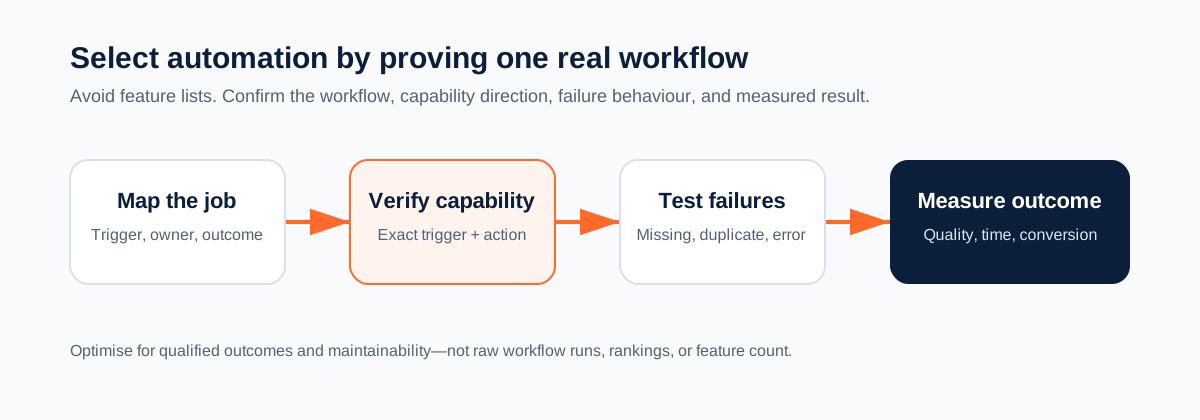
Do not compare demos. Compare one narrow workflow in a test environment. Use the same inputs and record:
- time from trigger to the intended business result;
- number of external calls, tasks, credits, and retries;
- field mapping and transformations;
- behaviour when a required field is missing;
- who can change the workflow;
- how an external write is approved or rolled back;
- how an operator finds and resolves an exception.
Include three input types: a normal record, an incomplete record, and a deliberately duplicated or failing record. A platform that looks fast in the happy path may create more manual work in the other two cases.
A simple selection worksheet
Write one sentence for the job, then answer these questions:
Job: what result should exist after the workflow runs?
Input: structured fields, text, documents, or a mix?
Decision: does a person need to approve anything?
Volume: how many runs and external calls per month?
Owner: who maintains credentials, rules, and failures?
Fallback: what happens when the workflow cannot decide?
If the answers are “structured fields, no approval, low volume, and an existing owner,” Zapier may be the cleanest choice. If the answers include documents, context, a human checkpoint, and an exception owner, evaluate a platform built for that middle step rather than pricing only the connector calls.
Limitations to keep visible
Prices, task rates, plan limits, and connector capabilities change. Check the vendor page before purchase. For Mazaal, verify the exact trigger and action in the app directory and confirm the plan limits for your account.
No automation platform removes the need for ownership. Regulated, destructive, financial, or permission-changing actions need a tested review and rollback path regardless of which tool runs them.
Start with one workflow
Pick one repetitive job and measure it before migrating anything. Map its trigger, inputs, decision, external write, owner, and exception path. Build the smallest test that can fail in a useful way. Keep the current Zap if it already does the job safely; move only when the new workflow handles a problem the old one cannot.
For a concrete CRM example, read Pipedrive workflows you can build with Mazaal AI. For a human-checkpoint design, see automated approval workflows.
Keep reading
All articles →
workflow automation
Best AI agent builders in 2026 (comparison for business teams)
A plain-English comparison of Mazaal, Lindy, Gumloop, Zapier Agents, n8n, Relevance AI and Voiceflow for ops, sales and support teams, covering channels, workflows, connectors, models, pricing and setup.
AI automation
AI Workflow Automation for Small Business: An Implementation Guide
A practical way for small businesses to choose, test, and operate an AI-assisted workflow without automating chaos or creating an unowned system.

workflow automation
How to Automate YouTube Video Transcription for Free with Mazaal AI
Discover how to automate YouTube video transcription for free with Mazaal AI. Save time, boost accessibility, and easily repurpose content using automated workflows.