
Best Workflow Automation Tools in 2026: A Practical Buyer's Guide
Choose workflow automation software by the job, operating model, and evidence—not a 30-product feature list. Compare the main categories and build a test that proves fit.
 Enod BataaUpdated August 1, 2026
Most "best workflow automation tools" lists make buying harder: they compare dozens of products with stale prices, generic feature bullets, and no test of the job you actually need to complete.
Start with the workflow. Then select the smallest class of tool that can run it safely, visibly, and without creating a maintenance burden your team cannot own.
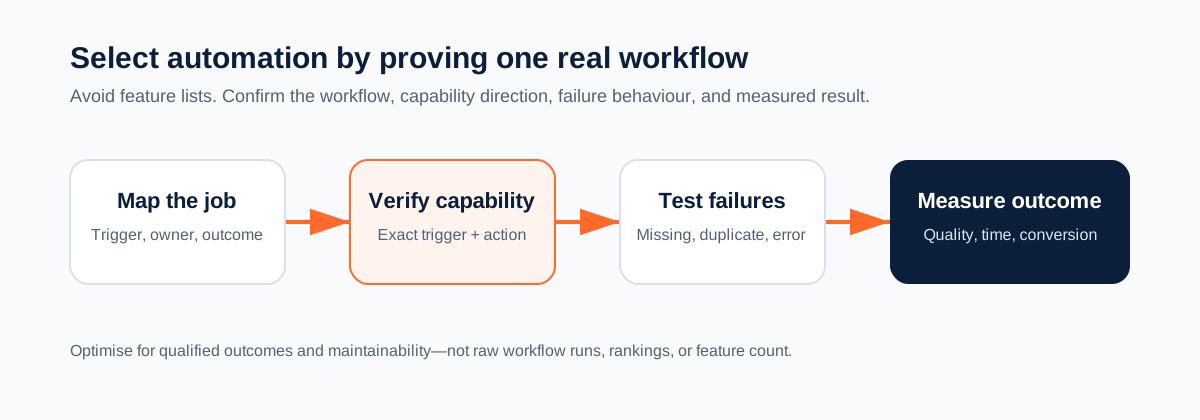
The five questions that narrow the market
- What starts the workflow? An app event, form submission, schedule, uploaded document, or person.
- What must happen next? Move data, create work, interpret unstructured content, make a decision, or ask for approval.
- Where does the result need to go? A CRM, accounting system, ticketing tool, shared inbox, database, or another person.
- What happens when the input is incomplete or wrong? Name the exception path before the happy path.
- Who will own the workflow? The person who changes rules and investigates failures should be identified before launch.
Choose a category before comparing brands
| Category | Good fit | Examples |
|---|---|---|
| App-to-app automation | Repetitive trigger/action workflows with structured fields | Zapier, Make |
| Microsoft automation | Teams already operating in Microsoft 365 and Power Platform | Microsoft Power Automate |
| Native automation | A simple workflow entirely inside the system of record | Pipedrive, HubSpot, Asana, Slack |
| Technical orchestration | Teams willing to own code, deployment, and integration complexity | n8n, developer workflow systems |
| AI-assisted workflow automation | Workflows that must read documents or messages, reason over context, then act through connected tools | Mazaal AI |
A product can span more than one category. The point is to avoid buying an enterprise process platform for a two-step task—or a simple connector for a workflow that needs judgement over unstructured information.
Where Mazaal AI fits
Mazaal AI is for teams that need automation and an AI layer in the same workflow. Its no-code product supports agents and workflows, with separate AI and Automation credits. The public pricing page currently lists Basic at $19/month, Pro at $49/month, Team at $129/month, and Business at $429/month; review the live page before making a purchasing decision.
A useful Mazaal workflow looks like this:
New record, email, or document
        ↓
Extract the facts that matter
        ↓
Apply a written business rule
        ↓
Ask a person to approve consequential actions
        ↓
Write the approved result to the connected system
That is different from a basic app sync. It is useful for lead qualification, document-heavy operations, customer-request routing, and processes where a person currently reads context before acting.
The selection criteria that matter
1. Supported trigger and action direction
Do not accept "we integrate with X" as an answer. Confirm the exact direction:
- Can the system trigger from X?
- Can it write the specific record or action back to X?
- Which fields are exposed?
- Is it webhook-based or scheduled polling?
For example, the current Mazaal Pipedrive catalog includes instant new and updated events for deals, leads, and people, plus actions such as adding activities, notes, leads, persons, and updating deals. Read the Pipedrive workflow guide before relying on a specific sales workflow.
2. Testability
A platform needs a safe way to test the actual fields, rules, and exceptions. Ask for a workflow test using a normal record, an incomplete record, a duplicate event, and a deliberate connector failure.
3. Governance
The workflow must have named owners, change controls, and an approval point for external, destructive, financial, or permission-expanding actions. Automation without accountability is just hidden work.
4. Cost under real usage
Price the live workflow, not the marketing headline. Count triggers, actions, loops, AI calls, schedules, retries, and data volumes. Revisit usage after the first month with actual run data.
5. Maintenance burden
The best tool is one the operating team can update when a form field, sales process, or policy changes. A technically impressive workflow is not a win if only a departing contractor can debug it.
A fair evaluation plan
Choose one high-frequency, bounded process. A good candidate has measurable manual work but a manageable failure impact.
- Document the current steps and the minutes spent per case.
- Build the smallest working version in a test environment.
- Define exact field mappings and a named exception owner.
- Test normal, incomplete, duplicate, and failed inputs.
- Measure time saved, completion quality, exceptions, and cost per completed case.
- Move to production only when the owner can explain how to stop and recover the workflow.
When not to automate
Do not automate an unstable process just because it is annoying. Fix an unclear policy, missing data, or ownership problem first. Do not use AI to make final decisions that require accountability, and do not turn on customer-facing, financial, destructive, or access-changing actions without a human approval and rollback plan.
Start with a real job
If your team is repeatedly reading requests, documents, or CRM notes before moving work forward, start a Mazaal AI workflow. For smaller teams choosing their first use case, read AI workflow automation for small business.
Keep reading
All articles →
workflow automation
How to Automate YouTube Video Transcription for Free with Mazaal AI
Discover how to automate YouTube video transcription for free with Mazaal AI. Save time, boost accessibility, and easily repurpose content using automated workflows.

workflow automation
Best AI agent builders in 2026 (comparison for business teams)
A plain-English comparison of Mazaal, Lindy, Gumloop, Zapier Agents, n8n, Relevance AI and Voiceflow for ops, sales and support teams, covering channels, workflows, connectors, models, pricing and setup.
AI automation
AI Workflow Automation for Small Business: An Implementation Guide
A practical way for small businesses to choose, test, and operate an AI-assisted workflow without automating chaos or creating an unowned system.